

lovender
-
Постов
0 -
Зарегистрирован
-
Посещение
Тип контента
Профили
Новости
Статьи
Мемы
Видео
Форумы
Блоги
Загрузки
Галерея
Весь контент lovender
-
Clan of Champions DMRA Armor Separated Into Parts
lovender прокомментировал lovender файл в Oblivion Mods
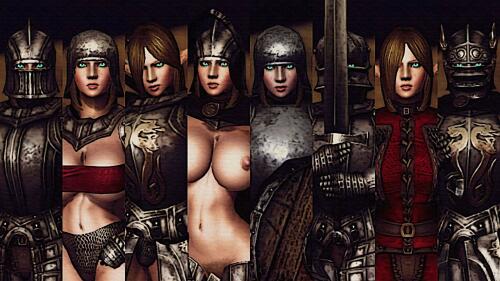 Bianor, MU Race. I included the link in the Mods Modified in This Mod section in the description.
 -
Версия 1.0.2
296 раз скачали
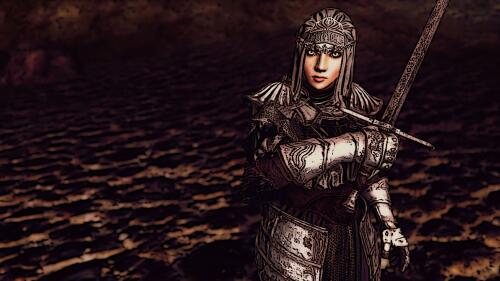
Clan of Champions Armor Separated Into Parts (SIP) v1.0.2 ====== With the release of my FMRA (Fankaizhi Manga Round Ass) Body Replacer, variations with DMRA upperbody now can be replacedwith FMRA upperbody as optional from: [Optional] Clothing Types\[Optional] Fankaizhi Nude Champion folder. Fixed 14 nif files inside: "[Optional] Clothing Types\[Optional] 0riginal\Meshes\Armor\ClanOfChampions\f" folderby removing doubles on right elbow, right shoulder, and back neck of DMRA upperbody. Added missing femaleupperbodyDMRANoBBB.nif to "Meshes\Characters\_male" folder. v1.0.1 ====== Fixed NPC Knight Armor nif models. Added Break Armor Framework broken states image. v1.0 Description =========== Added medieval armors and weapons; from the "not successful" game Clan of Champions, that I like them so much, and separate them into parts to make lots of possible variations like in the original game. The original game has 8 armor slots: 1. Head 2. Body Armor 3. Right Arm 4. Left Arm 5. Right Leg 6. Left Leg 7. Garment Top 8. Garment Bottom, and 2 weapon slots: 1. Right Weapon 2 .left weapon But with Oblivion's head, upperbody, lowerbody, hand, foot, amulet, left ring, right ring, & tail slot, I can get 9 armor slots in Oblivion. So the variations will be more than the original game. The list of armors I converted so far: - Plate Mail - Plate Spaulders - Plate Arm Guards - Plate Gauntlets - Plate Leggings - Plate Sabatons - Bascinet - Knight Plate - Knight Spaulders - Knight Bottom - Knight Top - Knight Shoes - Heavy Bascinet - Cuirass - Vambraces - Gloves - Greaves - Shoes - Helm - Battle Gauntlets - Sallet The list of weapons I converted so far: - Longsword - Earth Shaker - Spiked Flail - Heater Shield - Small Shield You can take: 1. Full Knight armor and NPC Heavy Bascinet helmets from Aelia NPC (behind the house on Applewatch). 2. Complete armor parts (except full Knight Armor and NPC Heavy Bascinet helmets) inside the Clan of Champions Chest that Aelia NPC is guarding. But you need a key. Take the key from her inventory with any companion mod or check her corpse after she died. Location ======== Applewatch (behind the house). *see the "ApplewatchLocationMap" and "ClanOfChampionsChestLocationMap" pictures for the exact location. **go behind the house shown in the "ClanOfChampionsChestLocation" picture, and talk to Aelia NPC (yeah, I know...her voice is still from Google Translate) Automatic Open-Close Visor Feature ============================== There are helmets with the name "NPC[helmet's name ]" that are scripted, so when the weapon is sheathed, the helmet's visor will be closed. And so when the weapon is unsheathed, the helmet's visor will be opened. Helmet FOV Feature ================ Equipping helmet with Open or Closed visor will mask parts of your screen in first person view to simulate decreased field of view (FOV) due to the visor's eye -slit. *see the FOV[helmet's name].GIF pictures for the view from the inside of the helmet. PREPARE YOURSELF FOR THE MOST REALISTIC-BUT-LIMITED VISION EXPERIENCE!!! But it can be dumped by doing one of these options below: a.delete fov_37 until fov_44 from ":Data\Meshes\Characters\_male\IdleAnims" directory path b.delete fov_37 until fov_44s from "Data\Textures\FOV" directory path c.deleting HelmetFOV.esp from Parent Masters by : i.opening TES CS II.Single click ClanOfChampions.esp iii. Single click HelmetFOV.esp on below right box, then press Delete button. It will ask you to delete it, say YES. iv. Open ClanOfChampions.esp, then save. v.Then delete HelmetFOV.esp from ":Data" directory path. WARNING!!! This mod will overwrite skeleton.nif in "Data\Meshes\Characters\_1stPerson" directory path Any other skeleton can cause the Helmet FOV to not appear on screen, because my Helmet FOV skeleton is "unique". It was edited based on LAPF Standard 1st Person Skeleton, so it should be safe and could not bring visual glitches. But it would be so wise if you backup your previous skeleton.nif first. ANOTHER WARNING!!! My Helmet FOV skeleton is not compatible with Enhanced Camera, because Enhanced Camera uses 3rd person body. Helmet FOV only appear for 1st person body. Real High Heels Feature =================== Equipping sabatons for female character will add her height a bit; depends on how high the heels are. Clothing Types ============ There are 2 types of Knight Sleeves & Knight Cape clothing: 1. With simple top (0original) 2. Without simple top (Nude Champion) Eye-slit Types === ======== There are 3 different types of eye-slit: 1. Original (clear; like in the original game) 2. Optional 1 (darker face) 3. Optional 2 (total black) *see the Eye -slitTypes picture. Custom Race =========== There's Elf Race for you to play as Elf in Oblivion. Has 2 types of race: 1. Elf: Elf Race with alpha glowing eyes 2. Elf (No Alpha): Elf Race without alpha glowing eyes Glowing Eyes =========== Elf Race in this mod uses Cernasite Dragon Eyes textures, but with modified vanilla eyes mesh and my own glow map .dds textures. It has 2 types: 1. Alpha: Eyes mesh with NiAlphaProperty enabled in NifSkope, that ignores any shadows casted on the eyes when in-game. 2. No Alpha: Eyes mesh without NiAlphaProperty, that can be looks darker when shadows casted on the eyes in-game. I prefer the Alpha, because in some dark places, you will see the eyes only. Remind me of Jawas in Star Wars or Vivi Ornitier in Final Fantasy IX. Looks cooler (even intimidating) when the helmet's visor is closed and the eyes color is red. 10 eyes colors available: 1. Aquamarine 2. Blue 3. Brown 4. Green 5. Gray 6. Orange 7. Pink 8. Purple 9. Red 10. Yellow Mods Modified in This Mod ========================= 1. Room207's CCC hair & eyelashes mod http://undersunandsky.blogspot.co.id/ 2012/04/comprehensive-cosmetic-compilation-18.html 2. miss_onatop's Elves of Lineage II mod for the head mesh http://www.nexusmods.com/oblivion/mods/12424/? 3. IDtenuky's MU Race mod for the eyes meshes & textures http://www.nexusmods.com/oblivion/mods/17638/? 4. whalecakes' Miqote Race mod for the eyelashes textures http://www.nexusmods.com/oblivion/mods/36018/? 5. navetsea's F-INevOblivion skinset mod for the skin textures http://www.nexusmods.com/oblivion/mods/19021/? 6. 1HWeaponOnBack for SoB http://www.nexusmods.com/oblivion/mods/24541/? 7. Helmet FOV https://www.nexusmods. 8. Vipcxjs Real High Heels System https://www.nexusmods.com/oblivion/mods/36883 9. Unequip Broken Armor http://www.nexusmods.com/oblivion/mods/32424 10. Break Armor Framework http:/ /www.loverslab.com/topic/13907-break-armor-framework/ Permission ========= Thanks to ACQUIRE Corp. for the 3D models and textures. Credits: ======== Special Thanks to fejeena for helping me creating the script to open/close NPC Helmets automatically, and to make Helmet FOV works in-game. Maskar for Unequip Broken Armor mod. Visman for 1HWeaponOnBack for SoB mod. Room207 for the CCC hair mod. miss_onatop for Elves of Lineage II mod. IDtenuky for the MU Race mod. whalecakes for Miqote Race mod. My fellow countryman navetsea for F-Inev Oblivion skinset textures. heavywaters for the lightsaber's script that I modified. XMarksTheSpot for the Helmet FOV mod that I expanded. Exnem. A-type2. Edhildil. MadCat221. Mktsang, Alexscorpion, Hellknight, Coronerra. RAIAR. Saaya and anyone else involved in the HGEC / GUTS / DMRA / Manga bodies and BBB / BB systems. Gerra6 for the great blender scripts. Last but not least: Thanks to all of you who like my kind of work. Can't wait to release another mod! -
Ashley Graham RE4 DMRA Armor Separated Into Parts
lovender прокомментировал lovender файл в Oblivion Mods
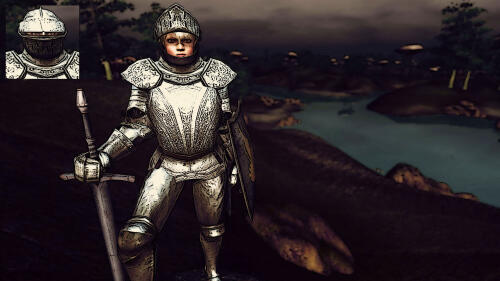 Update v1.0.1 is released. Please download to fix the issues in the v1.0. Thanks.
 -
Ashley Graham RE4 DMRA Armor Separated Into Parts
lovender прокомментировал lovender файл в Oblivion Mods
Lord RZ, Thanks for the link. I included it in the description. Thanks for your suggestion. -
Ashley Graham RE4 DMRA Armor Separated Into Parts
lovender прокомментировал lovender файл в Oblivion Mods
2Anna2, Hello there. I released the update v1.0.1 Please check. Hope it will fix the issue. Let me know if there's still a problem. Thanks. -
Ashley Graham RE4 DMRA Armor Separated Into Parts
lovender прокомментировал lovender файл в Oblivion Mods
abbath13fd, Hello there. This mod did not use/masters-parented to any high heels mod, because the foot armor here has no high heels. But for my other mod that linked to high heels.esp, I think that's still okay if you replace it with your high heels.esp, because usually I only need the LLLhighheelsscript to make the player & NPC taller in my mod. And I believe, LLLhighheelsscript is included in any version of high heels mod. -
Ashley Graham RE4 DMRA Armor Separated Into Parts
lovender прокомментировал lovender файл в Oblivion Mods
Lord RZ, Hi. for the Helmet FOV feature, I already include the skeleton in the Meshes\Characters_1stPerson folder path. But for DMRA body, since the original author already get banned on Nexus site, I still can't find link from any other website. But maybe you can download the Fine Tuned DMRA Body Replacer on Nexus. -
Ashley Graham RE4 DMRA Armor Separated Into Parts
lovender прокомментировал lovender файл в Oblivion Mods
2Anna2, About the new race, usually I make it for the NPC in my mod. So if I release the new race separately, it will be difficult for me to create the NPC if I have to merge 2 .esps. So for now, I still decide to include the new race in the same .esp. Besides, maybe it's not "race", but "specific character". Because to make specific characte like Ashley from the original game, I have to make: different body textures, different pubic hair, different eyes textures, etc. And it can only be done by making a new race. But because usually it's for NPC, I provided the wig if users want to use their own character, but wanting to look a bit like Ashley (cosplaying). But if users really2 want to look excatly like my character in the screenshots, please use Oblivion Face Exchange Lite and copy the face from the NPC in the cathedral to your character's face. Hope I explained well. Feel free to ask if you still have questions. Thanks. -
Ashley Graham RE4 DMRA Armor Separated Into Parts
lovender прокомментировал lovender файл в Oblivion Mods
2Anna2, Hello. I think I missed to include the RenEye19.dds texture in Textures\Characters\Ren\Eyes folder path. But if I check the hair textures, pl01kami0.dds texture is already in Textures\Armor\RE4\Ashley folder path. Let me check another issue first, then I will release the update ASAP. Sorry for the incovenience... -
Ashley Graham RE4 DMRA Armor Separated Into Parts
lovender прокомментировал lovender файл в Oblivion Mods
Hello, guys. Sorry for the late reply. Because no notifications appears on my profile. Let me check all the issues, and I will reply every comment here. Thank you for your patience. -
 Quorwyf, I explained the details in my mod comment page. Please take a look. And have fun!
 -
Souls Series DMRA & RobertMusc Armor Separated Into Parts
lovender прокомментировал lovender файл в Oblivion Mods
 Addon Shield on Back is not a must, because it only use file .bck file beside the ShieldName.nif file. So if you delete ShieldName.bck file, the shield won't be on back. About the helmet FOV: I edited it based on LAPF Standard 1st Person Skeleton, that compatible with boobs, butt, even wings mesh. So I'm pretty sure it won't be incompatible with some race mods. But I never test it with all race mods... It would be wise to backup your previous skeleton file first, before trying my skeleton. Yes, it can be dumped by doing one of these options below: a. delete fov_52_flutedhelmetclosed.kf, fov_53_flutedhelmetopen.kf, fov_54_sunlessveil.kf from ":Data\Meshes\Characters_male\IdleAnims" directory path b. delete fov_52_flutedhelmetclosed.dds, fov_53_flutedhelmetopen.dds, fov_54_sunlessveil.dds from "Data\Textures\FOV" directory path c. deleting HelmetFOV.esp from Parent Masters by: i. opening TES CS ii. Single click DarkSouls3.esp iii. Single click HelmetFOV.esp on below right box, then press Delete button. It will ask you to delete it, say YES. iv. Open DarkSouls3.esp, then save. v. Then delete HelmetFOV.esp from ":Data" directory path. With all the steps I explained above, I'm sure you can dump the Helmet FOV feature. Let me know if the explanations above didn't work...
 -
Souls Series DMRA & RobertMusc Armor Separated Into Parts
lovender прокомментировал lovender файл в Oblivion Mods
xopoma, I'm not sure what do you mean... But if you mean: you ask me for a Russian translate version, a member here (abbath13fd) plans to release the Russian version. So please wait until he release the Russian .esp mod here. Thank you for your patience. -
Souls Series DMRA & RobertMusc Armor Separated Into Parts
lovender прокомментировал lovender файл в Oblivion Mods
Thelostman, Yup. That's why I share. :) -
Souls Series DMRA & RobertMusc Armor Separated Into Parts
lovender прокомментировал lovender файл в Oblivion Mods
KhajiitJess, Me too! You're welcome. -
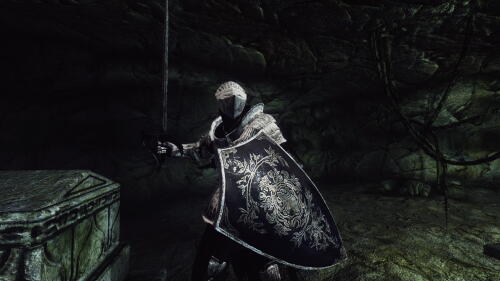 desertmage, Yep, I know. I downloaded your mod. Keep up the good work!
 -
Just want to inform to those who wants Knight's set from Demon's Souls, the mod can be downloaded here: tesall.ru/files/modi-dlya-oblivion/bronya-odezhda-aksessuari/12701-souls-series-dmra-robertmusc-armor-separated-into-parts-ot-lovender
-
Souls Series DMRA & RobertMusc Armor Separated Into Parts
lovender прокомментировал lovender файл в Oblivion Mods
Please redownload the reuploaded file (v1.1_1). Because the previous one are missing Ostrava sword, shield, and Sirris FOV textures. -
Версия 1.1_1
128 раз скачали
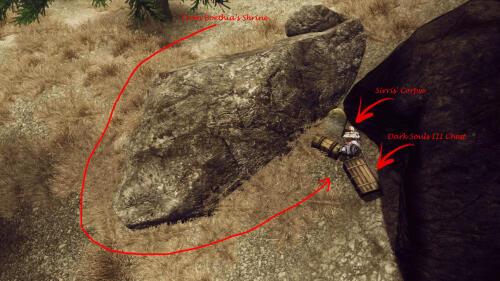
Souls Series DMRA and RobertMusc Armor Separated Into Parts (SIP) v1.1_1 v1.0 Added Sirris' armor & weapon from the game Dark Souls III, and separate them into parts to customize your character's appearance. You can take: Full armor & weapons that Sirris wears in the Dark Souls III game; directly from her corpse at Lonely Grave. Complete parts inside the Dark Souls III Chest near her corpse at Lonely Grave. Go the Boethia's Shrine as shown in the "BoethiaShrineLocationMap" picture, then go south. You'll see 2 chests near a gravestone. v1.1 Added Ostrava's armor (Fluted Set) & weapon from the game Demon's Souls, and separate them into parts to customize your character's appearance. There's Ostrava NPC too at Imperial City Talos Plaza District. You can take: Full armor & weapon that Ostrava wears in the Demon's Souls game directly from him; if you kill him, or make him your companion then trade his inventory. Complete parts inside the Demon's Souls Chest behind him. Go the Imperial City Talos Plaza District as shown in the "Location" picture. Location v1.0 To make it the same like Sirris' questline in the Dark Souls III (where after defeating the Twin Princes, her corpse can be found at her grandfather's grave; containing the Sunless Talisman and her armor ), in Oblivion, I put Sirris's corpse at Lonely Grave. What? Lonely Grave?? Where the heck is this Lonely Grave??? There are specific places of interest in Cyrodiil that are not marked on your map, do not appear on the compass, and aren't directly related to any of Oblivion's quests. Travel to Boethia's Shrine (located southeast of Cheydinhal in the Valus Mountains). At the south of Boethia's shrine stands an isolated gravestone with a chest containing minor treasure...and also a Dark Souls III Chest. *see the "BoethiaShrineLocationMap" picture for the exact location. **also see the "DarkSoulsIIIChestLocation" and "DarkSoulsIIIChestLocationMap" pictures for the exact location of the chest. v1.1 Go to Imperial City Talos Plaza District. *see the "Location" and "LocationMap" pictures for the exact location of the chest. What Parts of Armor & Weapon in this mod??? v1.0 List of Sirris' armor parts: - Chain Cape - Chain Skirt - Gauntlets - Greaves - Greaves + Shorts - Leggings - Leggings (No Pants) - Leggings + Stockings - Pauldrons - Sabatons - Talisman - Tassets - Veil (has Helmet FOV Feature) List of Sirris' clothing parts: - Corset - Corset + Skirt - Shirt + Corset - Shirt + Corset + Skirt List of Sirris' weapons: - Estoc - Estoc 2H v1.1 List of Ostrava's armor parts: - Breastplate - Gauntlets - Helmet (Closed) (has Helmet FOV Feature) Has 3 eye-slit types (optional) - Helmet (Open) (has Helmet FOV Feature) - Leggings - Pauldrons - Shoes - Tassets - Kite Shield - NPC Helmet (Closed) (the visor will open & closed automatically if you sheath or unsheath your weapon, has Helmet FOV Feature) - NPC Helmet (Open) (the visor will open & closed automatically if you sheath or unsheath your weapon, has Helmet FOV Feature) Closed Visor Helmet has higher defense compare to Open Visor Helmet. Realistically because it protects your face, but it also has limited vision due to Helmet FOV Feature. List of Ostrava's weapons: - Long Sword - Long Sword 2H Real High Heels Feature Equipping sabatons for female character will add her height a bit; depends on how high the heels are. Helmet FOV Feature Equipping helmet with Open or Closed visor will mask parts of your screen in first person view to simulate decreased field of view (FOV) due to the visor's eye -slit. *see the "FOVFlutedHelmet" and "FOVSunlessVeil" pictures for the view from the inside of the helmet/veil. PREPARE YOURSELF FOR THE MOST REALISTIC-BUT-LIMITED VISION EXPERIENCE!!! Custom Race v1.0 There's Sirris Race for you to play as Sirris in Oblivion. v1.1 There's Ostrava Race for you to play as Ostrava in Oblivion. Recommended Mods DMRA Fine Tuned Body Replacer https://www.nexusmods.com/oblivion/mods/34523/ F-INevOblivion skinset for EC and HGEC https://www.nexusmods.com/oblivion/mods/19021 Vipcxjs Real High Heels System https://www.nexusmods.com/oblivion/mods/36883 RobertMaleBodyReplacerV52 https://www.nexusmods. com/oblivion/mods/40532? Helmet FOV https://www.nexusmods.com/oblivion/mods/8991 Addon for Shield on Back v31 https://www.nexusmods.com/oblivion/mods/20572 Installation Place the data folder inside your Oblivion directory, replace any folders and meshes. Permission Thanks to FromSoftware for the 3D models and textures. Credits Special Thanks to fejeena for helping me creating the script to open/close NPC Helmets automatically, and to make Helmet FOV works in-game. Thanks to Bethesda for the game. Thanks to Tokami Fuko for the conversion. Thanks to my fellow countryman navetsea for F-Inev Oblivion skinset textures. Thanks to heavywaters for the lightsaber's script that I modified. Thanks to XMarksTheSpot for the Helmet FOV mod that I expanded. Last but not least: Thanks to all of you who like my kind of work. Can't wait to release another mod! -
Ashley Graham RE4 DMRA Armor Separated Into Parts
lovender прокомментировал lovender файл в Oblivion Mods
Thelostman, Hell yeah, that is. LOL! -
Ashley Graham RE4 DMRA Armor Separated Into Parts
lovender прокомментировал lovender файл в Oblivion Mods
Pycuq, That's okay, I'm not feel offended anyway. Feel free to say anything in the comment. But yeah, the third screenshot it's just to show one of all variations in this mod. Since I love both DMRA body & Knighthood so much, I roam Cyrodiil that way. LOL! Besides, on my side, it kinda turn me on seeing half-naked knight (with big boobs of course) like that. And yup, I know pretty well how to dress in steel; where under the steel there are leather, straps, etc. But since this is Oblivion; where magic exist, I pretend she uses some kind of magic to hold the steel without straps. Maybe if this is Star Wars universe, she uses the Force. That's all then. Thanks. -
Sanyok, That's my specialty in modding btw.. ^_^ I call it SIP (Separated Into Parts) in all my mod's name. So far lots of my mods is on Nexus. But since I also like to be here, will upload my mods here too.
-
Hikki, I did the knight's armor (wear by Ostrava too) btw. I'll release soon here.
-
Версия 1.0.2
161 раз скачали
Ashley Graham RE4 DMRA Armor Separated Into Parts (SIP) v1.0.2 v1.0.2 ====== With the release of my FMRA (Fankaizhi Manga Round Ass) Body Replacer, DMRA GrahamChainSleeveLR.nif now can be replaced with FMRA version as optional from: "[Optional] Clothing Types\[Optional] Fankaizhi Nude Knight" folder. Added new body textures with bigger nipples. Fixed old DMRA GrahamChainSleeveLR.nif by removing doubles on right elbow, right shoulder, and back neck of DMRA upperbody. Fixed Ashley Wig. v1.0.1 ====== Added missing eyes textures for both Ashley & Leon Race/NPC. Fixed Armadura Sword model to make the reflection on the blade more realistic. Fixed Ashley Race's male texture path in the RE4.esp. v1.0 Description ========= Added Ashley Graham armor from the game Resident Evil 4, and separate them into parts to customize your character's appearance. Also added Armadura Sword used by living armor enemy (Armadura) in that game. You can take: 1. Full armor that Ashley wears in the Resident Evil 4 game; directly from Ashley NPC, on the left side of Chapel of Stendarr. 2. Complete parts inside the Evil Chest outside of the Chapel of Stendarr. Go the park as shown in the EvilChestLocation picture, you'll see the chest near the stone wall. Hey, there's Leon NPC too on the right side of Chapel of Stendarr! I have no interest working on male costume, so I leave him naked... :D Just disable him if you don't like seeing people naked in the chapel. lol! But maybe for the next update (v1.1), I'll work on Armadura Armor to be equipped by Leon NPC. Please wait... Location ======= Chapel of Stendarr at Chorrol. *see the "EvilChestLocation" and "EvilChestLocationMap" pictures for the exact location. **also see the "NPCLocationMap" picture for the exact location of the NPCs. What Parts of Armor & Weapon in this mod??? ==================================== List of armor parts: - Arm Guard - Armor (the shape on the hip has been resized smaller, and the shape on the chest has been resized bigger to fit DMRA body) - Boots - Chain Sleeves - Cuisses + Poleyns - Gauntlets - Gorget - Helmets (the size of the helmet has been resized smaller to match the player's eye level with the eye-slit of the visor) - NPC Helmets (the visor will open & closed automatically if you sheath or unsheath your weapon) *see the video attached on this mod page on Nexus - Pauldrons - Poleyns List of clothing parts: - Ashley's Wig - Leon's Wig List of weapons: - Armadura Sword 1H - Armadura Sword 2H Helmet FOV Feature ================ Equipping helmet with Open or Closed visor will mask parts of your screen in first person view to simulate decreased field of view (FOV) due to the visor's eye -slit. *see the FOVGrahamHelmet.GIF picture for the view from the inside of the helmet. PREPARE YOURSELF FOR THE MOST REALISTIC-BUT-LIMITED VISION EXPERIENCE!!! Eye-slit Types =========== There are 3 different types of eye-slit: 1. Original (total black like in the original game) 2. Optional 1 (darker face) 3. Optional 2 ( clear) *see the Eye-slitTypes picture. Custom Race =========== There's Ashley Race for you to play as Ashley Graham in Oblivion. Recommended Mods ================= 1. F-INevOblivion skinset for EC and HGEC https://www.nexusmods.com/oblivion/mods/19021 2. Helmet FOV https: //www.nexusmods.com/oblivion/mods/8991 Requirement ================= 1. DMRA original body replacer: tesall.ru/files/modi-dlya-oblivion/repleiseri-tela/repleiser-dmra/2318-dmra-body-replacer Installation ========= Place the data folder inside your Oblivion directory, replace any folders and meshes. Permission ========= Thanks to Capcom for the 3D models and textures. Credits ====== Special Thanks to fejeena for helping me creating the script to open/close NPC Helmets automatically, and to make Helmet FOV works in-game. Thanks to Bethesda for the game. Thanks to XKammyX for the conversion. Thanks to my fellow countryman navetsea for F-Inev Oblivion skinset textures. Thanks to heavywaters for the lightsaber's script that I modified. Thanks to XMarksTheSpot for the Helmet FOV mod that I expanded. Last but not least: Thanks to all of you who like my kind of work. Can't wait to release another mod!